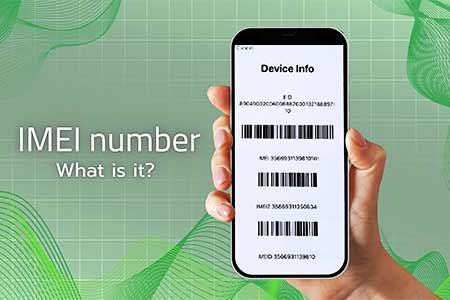

Checking a phone’s IMEI is an important step before buying a new, used or refurbished handset in Uganda. It can help you identify mismatched device information and investigate concerns about the phone being offered.
However, an IMEI check is only one part of a safe purchase. It does not independently prove ownership, confirm battery condition or guarantee that a phone has no account restrictions.
*To check a phone before buying it, display its IMEI by dialling #06#, compare it with the device information in Settings, and use Uganda Communications Commission’s official SIMU Klear device-verification service. Investigate any unexplained mismatch before paying.
Always check the actual handset being sold rather than relying solely on its box or a screenshot supplied by the seller.
What Is an IMEI?
IMEI stands for International Mobile Equipment Identity. It identifies cellular equipment on mobile networks.
The standard IMEI displayed for checking normally contains 15 digits. A phone may show more than one IMEI where it supports multiple cellular identities.
An IMEI is different from your telephone number. Changing the SIM card does not normally change the handset’s IMEI.
IMEI, serial number and SIM number: the difference
| Identifier | What it identifies |
|---|---|
| IMEI | Cellular equipment |
| Serial number | The individual product within the manufacturer’s records |
| Model number | A particular device model or variant |
| Telephone number | Your subscribed mobile line |
| ICCID | The SIM card or SIM profile |
| EID | An eSIM-related hardware identifier on supported devices |
When a verification form asks for an IMEI, do not enter the serial number, telephone number or EID instead.
1. Get the IMEI From the Phone Itself
Ask the seller to switch on the handset and allow you to inspect it.
On compatible phones:
- Open the Phone application.
- Open the dial pad.
- Enter *#06#.
- Read the identifiers displayed.
You generally do not need to make a call. A SIM card is not normally required to display the IMEI.
If the code does not work, check Settings or the manufacturer’s instructions. Failure of the shortcut alone is not proof that a phone is counterfeit.
Avoid relying on a seller’s screenshot
A screenshot can belong to another device or show outdated information.
Display the number yourself, with permission, and keep the handset in view throughout the inspection.
2. Find the IMEI in Settings
Checking another location helps confirm that you have copied the correct identifier.
On Android
A common route is:
Settings → About phone → IMEI
Some manufacturers place the information under Status, Device information or SIM status.
Use the Settings search function if needed.
On Samsung Galaxy
Open:
Settings → About phone
Depending on the model, this screen displays the model name, serial number and IMEI information.
On iPhone
Open:
Settings → General → About
Scroll to the IMEI information. On supported devices, you can also view identifiers through the information button on the initial setup screen.
Do not remove sealed components or attempt to open a phone simply to find its IMEI.
3. Check Every IMEI Shown
Some phones display IMEI 1 and IMEI 2.
Record and check both where available. Do not assume that checking one automatically establishes the status of the other.
The number of identifiers and their relationship to physical SIMs or eSIMs depends on the model.
Also confirm that the phone’s actual SIM configuration matches the advertisement. A seller may describe a device as dual SIM even when its arrangement differs from what you expect.
4. Use UCC’s Official SIMU Klear Service
UCC provides a device-verification facility through its SIMU Klear platform.
Using your own trusted browser:
- Open UCC’s official SIMU Klear website.
- Select Know Your Device or the device-lookup option.
- Enter the IMEI exactly as requested.
- Complete any verification prompt.
- Submit the enquiry.
- Read the result carefully.
The service’s device-lookup form requests an IMEI without spaces or dashes.
Check that you are using the official UCC service rather than a similarly named website advertising paid “unlocking” or “cleaning” services.
5. Check Through the Available USSD Menu
UCC also directs users to dial *197# and follow the prompts for checking a device.
Read the menu labels carefully. The service can include other functions, such as checking numbers associated with your identity.
Do not confuse:
- Checking a device’s IMEI.
- Checking SIM cards registered in your name.
These answer different questions.
Menu availability and wording can change. If you cannot locate the device-checking option, use the official online service or ask your operator for assistance.
Read Also: Time Inc. (timeinc.com)
6. Compare the Result With the Handset
Where the lookup returns manufacturer or model information, compare it with the actual phone.
Check:
- Brand.
- Model or model family.
- Model number where provided.
- Any status message.
- Any instruction to seek further verification.
For example, if the seller offers a Samsung handset but the lookup identifies an unrelated manufacturer, pause the purchase.
A result may sometimes use a technical model designation rather than the familiar retail name. Investigate the difference before concluding that it proves fraud.
How to respond to different results
| Result or situation | What to do |
|---|---|
| Device information appears consistent | Continue ownership and hardware checks |
| An unrelated model appears | Recheck the number and request clarification |
| A warning or restriction appears | Pause the purchase and seek official guidance |
| No record or unclear result | Check for typing errors and ask UCC or the operator |
| Verification service is unavailable | Retry later or obtain official assistance before deciding |
| Seller refuses inspection | Consider another seller |
Do not let urgency replace verification.
7. Compare the Phone, Packaging and Receipt
Where available, compare identifiers on:
- The handset’s Settings screen.
- The dial-code display.
- Original packaging.
- Purchase documentation.
- Manufacturer-applied labels.
A mismatch can have different explanations. A replacement box, for example, may not belong to the handset.
However, an unexplained mismatch should not be ignored.
Ask the seller to identify the actual device accurately on the receipt. If the handset was repaired or replaced previously, request supporting documentation where available.
Do not accept packaging as a substitute for inspecting the phone.
What an IMEI Check Can Tell You
Depending on the service and information available, a check may help you:
- Compare the identifier with expected device details.
- Identify an obvious model mismatch.
- Review a reported device status.
- Decide whether further investigation is necessary.
It also gives you an identifier to include in purchase records and any later loss report.
What an IMEI Check Cannot Guarantee
A favourable result is not a complete certificate of authenticity, ownership or condition.
It does not necessarily establish that:
- The seller owns the handset.
- The phone has never been stolen.
- No future loss report will be made.
- Every component is original.
- The battery is healthy.
- The device is free from account locks.
- An instalment agreement has been settled.
- The phone will work on every Ugandan network.
- There are no hidden hardware faults.
Counterfeit or altered devices may also display copied identifiers.
Treat the result as one piece of evidence alongside the seller’s records, physical inspection and activation checks.
read Also;How to Find the IMEI or MEID Number on any Mobile Phone
8. Check Ownership Locks Separately
A phone can display a plausible IMEI while remaining linked to a previous owner.
For an iPhone
Have the seller remove their ownership association through Apple’s official process. Confirm that the erased phone can activate without asking for the previous owner’s account.
An initial welcome screen alone does not establish that ownership restrictions have been removed.
For an Android phone
Have the seller remove their accounts and reset the device through the appropriate process.
Confirm that setup does not require credentials that the seller cannot legitimately provide or remove.
Also investigate any notice indicating that an organisation manages the phone.
Do not pay extra for an unofficial promise to bypass a restriction later.
9. Test the Phone Before Paying
After checking identity and ownership, test essential functions.
Use your intended SIM where practical and confirm:
- Calls.
- Mobile data.
- Wi-Fi.
- Charging.
- Touchscreen response.
- Microphone and speakers.
- Front and rear cameras.
- Buttons and biometric features.
Check the battery for swelling and watch for unexpected shutdowns or excessive heat.
A phone passing an IMEI check can still be poor value because of repair costs or limited remaining software support.
10. Keep a Receipt Identifying the Device
Ask for a written receipt showing:
- Seller or shop details.
- Purchase date.
- Make and model.
- IMEI or IMEIs.
- Price paid.
- Disclosed defects.
- Warranty or return conditions.
Keep payment confirmation and the original advertisement.
Record the identifiers privately. You do not need to publish them in social media posts or public complaints.
What to Do if You Suspect a Problem
If a result is unclear, contact your operator or UCC before completing the purchase.
UCC lists 0800 222 777 as its toll-free contact number and [email protected] for complaints.
Describe the discrepancy accurately. A model mismatch or failed lookup requires investigation; it does not automatically establish who committed an offence.
If you have already paid:
- Preserve the receipt and messages.
- Record the problem and verification result.
- Contact the seller in writing.
- Request an explanation and appropriate remedy.
- Seek official assistance if the concern remains unresolved.
If you suspect the device is stolen, report the concern to police rather than attempting to alter its identifiers.
Frequently Asked Questions
Can I check an IMEI without a SIM card?
Usually, yes. The phone can normally display its identifier without a SIM. Online verification requires an internet connection, which can come from another device.
Does a valid IMEI prove the phone is genuine?
No. A copied identifier can appear plausible. Compare device details and complete the other inspection steps.
Is an IMEI the same as my phone number?
No. The IMEI identifies equipment, while the telephone number relates to your subscribed line.
Why does the phone have two IMEIs?
Some devices support multiple cellular identities. Check each identifier and confirm the model’s SIM arrangement.
Does resetting a phone change its IMEI?
A normal factory reset should not change the device’s IMEI. It removes user data and settings rather than assigning a new equipment identity.
Should I buy a phone when the seller promises to change its IMEI?
No. Altering an identifier does not establish legitimate ownership or resolve the underlying concern. Seek official clarification and consider another device.
What if the lookup returns no result?
Recheck the digits and selected identifier. If the result remains unclear, seek help from UCC or your operator rather than treating the absence of a result as approval.
Read Also:How to find your Samsung Phone or Tablets IMEI, Model or Serial Number Easily